Last updated: August 12, 2026
- Quick Answer: For osha poster requirements workplaces: which notices you must display , most U.S.
- Key Facts – Most employers with employees need the current federal OSHA poster.
- – OSHA’s poster page and poster download page are the fastest way to verify the current version.
- Start with the federal OSHA workplace poster.
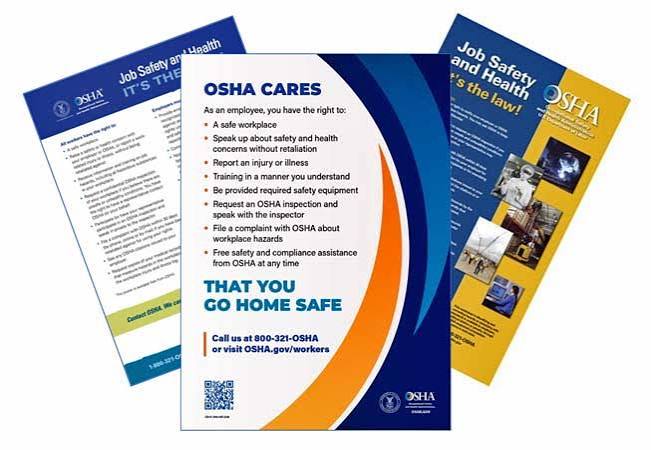
Quick Answer: For osha poster requirements workplaces: which notices you must display, most U.S. employers with employees need to post the current Job Safety and Health: It’s the Law notice where workers can see it; in many workplaces that means 1 federal poster, plus any state-required notices. The exact list depends on your state, your locations, and whether you have remote or multilingual staff.
Run any U.S. workplace, and this is where the checklist starts: osha poster requirements workplaces: which notices you must display usually begins with the current Job Safety and Health: It’s the Law notice in a place employees can actually see. A few other federal or state notices may join it. The answer shifts with your workforce, your state, and whether people are remote, multilingual, or split across sites.
Key Facts
– Most employers with employees need the current federal OSHA poster.
– The poster should be in a common employee area such as a break room, time clock area, lunchroom, or near the main entrance.
– State-plan states can add their own posting rules.
– Remote and hybrid teams may need electronic access in addition to a physical posting.
– OSHA’s poster page and poster download page are the fastest way to verify the current version.
What Actually Triggers the Poster Rule
Have employees? Start with the federal OSHA workplace poster. When you are a covered private employer under federal OSHA, hang it where people actually pass by—break room, time clock area, lunchroom, near the main entrance, or another shared spot. And if nobody walks past it, it might as well be wallpaper.
The core notice is the OSHA poster itself, not a binder full of policies. It tells workers about safe-workplace rights, complaint filing, and hazard information. As a practical rule, assume it applies unless a specific exemption fits, then confirm the details with OSHA or a qualified professional. OSHA’s posting page is here: https://www.osha.gov/posters.
“Low risk” does not make it go away. “Only a few people” doesn’t either. When you have employees, the duty is still there. Some workplaces also sit under state OSHA programs, and those states can tack on their own rules. Sometimes the federal poster stays in place; sometimes you also need a state notice or a different version. No shortcut.
A good source to confirm the current federal poster and related posting guidance is OSHA’s own posting page and poster download page:
– OSHA posting requirements: https://www.osha.gov/posters
– OSHA poster download page: https://www.osha.gov/publications/poster
When in doubt, check those first, then move to your state labor agency. That’s where people get snagged. For state-plan details, OSHA’s state plans page is a useful starting point: https://www.osha.gov/stateplans.
Quick check: when you have employees and no one has verified the current poster for your state, you should assume you need to fix that.
Which OSHA Notices You Must Display in a Typical Workplace
Do you need one poster or a wall full of notices? Usually, it’s one federal OSHA poster, plus any other notices required by your state or by specific laws that apply to your workplace. The common slipup is treating “OSHA poster” as the whole job. That leaves other required postings out in the cold, so confirm the full list with OSHA, your state agency, or counsel. The poster is only one slice of the compliance picture.
Here is the practical split:
| Situation | Best Path | Why Other Options Fail |
|---|---|---|
| Private employer in federal OSHA territory | Display the current federal OSHA poster in a common employee area | Skipping it leaves you out of compliance; old versions may not reflect current rights |
| Employer in a state-run OSHA plan | Display the federal poster and any state-required worker safety notice | Assuming the federal poster alone is enough can miss state-specific wording or extra postings |
| Multi-site employer | Post at each site where employees report or gather | One central office poster does not help workers at other locations |
| Remote or hybrid workforce | Use physical posting at any office plus electronic access if your state or policy supports it | Relying only on email makes the notice easy to miss |
| Spanish-speaking or multilingual workforce | Use the English poster and add translated versions where appropriate | A poster no one can read does not do its job |
Got a more complicated setup? Then the real question is not “How many posters can I fit?” It is “Which notices do my employees need to see, and where will they actually see them?”
The federal OSHA poster is the baseline. But other federal postings may also matter depending on your workforce and the laws that apply, such as wage-and-hour notices from the Department of Labor, anti-discrimination notices from the EEOC, family and medical leave notices, and workers’ compensation notices from your state. Those are not OSHA notices, but in practice they live on the same wall.
When you are only trying to solve the OSHA piece, stay focused on the current federal poster and any state OSHA poster or notice. OSHA’s workplace poster page is the best official reference for the federal requirement: https://www.osha.gov/posters.
Quick check: when your posting area has only one sign and no one has checked state rules, you are probably under-posting.
If You Run a Small Office, Here’s the Fastest Compliant Path
Small office? Clinic? Studio? Shop? For a single-site workplace like that, the simplest legal route is to print the current OSHA poster from OSHA’s website or order an official copy, post it in a common area, and make sure it stays readable. A small office does not get a special rule; it just has fewer hiding places. Don’t wait for an incident to discover the poster was buried behind a coat rack.
Use this path when:
– you have a single location,
– most employees pass the same break room, front desk, or entrance,
– and you are not sure whether your state has extra posting rules.
A straightforward process looks like this:
- Go to OSHA’s posting page and confirm the current poster version.
- Check whether your state has an OSHA-approved state plan and state-specific posting requirements.
- Download or order the poster in the language your employees can read best.
- Place it in a common employee area where people naturally stop.
- Make sure the poster is not folded, faded, covered, or hidden by other notices.
- Review the posting spot during routine safety or HR checks.
Want a quick benchmark? Ask this: can a new employee find the poster without asking anyone? When the answer is no, move it.
A lot of offices miss a second point here: they print the poster, then file the PDF away. That is not posting. When it is not visible on the wall or in a compliant electronic system for remote workers, it does not help.
One more caution: when your office is part of a larger building, do not assume the landlord’s lobby posting covers you. Each employer has its own duty.
Quick check: when your staff can’t point to the OSHA notice in ten seconds, your posting setup needs work.
If You Have Remote, Hybrid, or Multi-State Employees
Once workers are scattered, the answer shifts. A single poster in headquarters may satisfy the wall rule for that site, but it does nothing for employees who rarely or never come in. Remote and hybrid teams need a system that makes the required notices easy to reach.
For fully remote employees, use two steps: keep the physical posting where any in-person staff gather, and provide electronic access to the poster and any related notices. OSHA has guidance for electronic access in some situations, but the exact answer can turn on the legal setup of the workplace and the state in question. When you are unsure, check the OSHA poster page and your state labor agency, then ask counsel or an HR compliance professional if your arrangement is unusual.
For multi-state teams, the trap is assuming one compliance rule fits everyone. It often does not. When one location is in a state OSHA plan and another is in federal OSHA territory, the posting package may differ.
Use this decision path:
- List every work location, including home offices that are treated as work locations for HR purposes, and confirm the setup with counsel if needed.
- Identify whether each state is under federal OSHA or a state plan.
- Confirm whether the state requires its own notice, a different poster, or extra labor postings.
- Post physically at each on-site location where employees gather.
- Set up electronic access for remote staff if that is part of your compliance approach.
- Audit the notices after any state-law change, office move, or major hiring shift.
If you have both office and field employees, the field crew still needs a place to see the notices. A locker room, job trailer, shop board, or dispatch area often works better than an HR office no one enters. For a mixed workforce, the goal is 1 visible posting point at each place employees actually report.
Convenience versus certainty. That is the trade-off. Electronic posting is handy, but it only works when people can actually find it. OSHA’s posting guidance is the safest place to confirm whether electronic access fits your setup: https://www.osha.gov/posters.
Quick check: when your team works from more than one place, one poster on one wall is usually not enough.
The Edge Cases That Break the Usual Advice
A workplace that looks “normal” makes the poster rule easy. One that doesn’t? The advice bends fast. These are the situations I’d watch first.
-
You have no fixed employee break area.
What changes: there is no obvious wall that every worker sees.
What to do instead: post at the most unavoidable worker touchpoint, such as the time clock, sign-in station, locker area, or dispatch point. -
You rely on contractors, not employees.
What changes: OSHA’s workplace posting rules are built around employees, not independent contractors.
What to do instead: confirm who is actually an employee under labor law before you decide the poster is unnecessary. When even a small group is truly your employee workforce, post for them. -
Your workforce is predominantly non-English-speaking.
What changes: a poster in English alone may not do its job.
What to do instead: use translated versions or multilingual posting where appropriate, while keeping the required official version available. -
You have a temporary site, pop-up location, or seasonal crew.
What changes: “temporary” does not mean “exempt.”
What to do instead: post at the site for the life of the job, in the spot workers use every day. -
Your state has its own OSHA plan or special posting rule.
What changes: the federal poster may be only part of the answer.
What to do instead: check the state labor agency or state OSHA page before you assume the federal poster finishes the job. -
Your workplace has very few employees and one owner-manager does everything.
What changes: people assume the rule disappears because the business is tiny.
What to do instead: verify whether you have employees at all, then post when you do. Size alone does not solve it.
Quick check: when your workplace has unusual staffing, language, or location issues, do not trust a one-poster-fits-all answer.
When the Standard Advice Is Wrong
When someone says “just print the poster and you’re done,” stop and look closer. That advice is too neat for a lot of real workplaces. It falls apart in three common situations: state-plan states, remote teams, and workplaces that need more than one required notice.
When you are in a state OSHA plan, the standard federal answer may be incomplete. The state may have its own required poster, its own language, or its own enforcement page. When you are in a hybrid workplace, a wall poster in the office does not reach the people working from home. When you are in a regulated industry, the OSHA poster may be only one item on a larger posting checklist.
A useful way to sort the problem is this:
- When you only have on-site employees in a federal OSHA state, the current OSHA poster in a common area is your first move.
- When you have any remote workers, add an electronic access plan that does not depend on memory or a buried intranet folder.
- When you are in a state-plan state, compare federal and state posting requirements before you stop.
- When your workplace is bilingual or multilingual, make the poster readable, not just present.
- When you recently moved, renovated, or expanded, re-check where the poster now needs to hang.
I would not turn this into a paperwork project for its own sake. The point is visibility. A notice nobody sees helps nobody.
When you are trying to decide whether you need legal or compliance help, get it when the facts are messy: multi-state payroll, disputed worker classification, union rules, or a state-plan jurisdiction you do not know well.
Quick check: when “print it and forget it” sounds like your current policy, you probably need a more careful review.
A Practical Compliance Checklist You Can Use Today
Need the shortest path to a decent answer? Use this checklist and walk it in order. It works for most employers who need to know what to display and where.
- Confirm whether you have employees, not just contractors.
- Identify whether each location is under federal OSHA or a state OSHA plan.
- Download or order the current federal OSHA poster from OSHA.
- Check whether your state requires a separate or additional notice.
- Post the notice in a common employee area at each location.
- Make the notice readable, current, and unobstructed.
- Set up an electronic posting method for remote staff if needed.
- Review the posting spot after moves, staffing changes, or state-law updates.
When you want to keep it simple, use a single rule: every employee should be able to see the required safety notice without hunting for it.
The better alternative is not “more posters.” It is the right poster, in the right place, for the people who actually work there. OSHA’s official poster page remains the fastest source for the federal version: https://www.osha.gov/posters.
Quick check: when you can’t point to your current OSHA posting setup in under a minute, it is time to fix it.
FAQ
Do I need the OSHA poster if my business is very small?
When you have employees, usually yes. Small size alone does not remove the posting duty.
Can I post the OSHA notice electronically instead of on a wall?
Sometimes electronic access helps, especially for remote workers, but I would not assume it replaces physical posting at an on-site location without checking the applicable rules.
What if I am in a state with its own OSHA program?
Check the state’s posting requirements. You may need the federal poster plus a state-specific notice.
Does one poster at headquarters cover all my locations?
Usually no. Post where employees at each location can actually see it.
What else should be posted besides the OSHA notice?
That depends on your workforce and laws. Check the Department of Labor, EEOC, FMLA, and your state labor agency for the notices that apply.